Your model is most important step in creating and easy yet simple way for end users to either self service or for other developers to create reports and dashboards.
I know you are here because you want to create the perfect product to impress your users. Well, you are in the right place, if you are looking for how to model your data for Power bi or SSAS. This article will focus on high level design but I will point you to the right book or course when needed. Please note that I am not affiliated in any way with books vendors to courses.
Now, lets get started: Let’s summarize things in the way I wish many blogs to be written, we will cut all this talking and go straight to the bullet points:
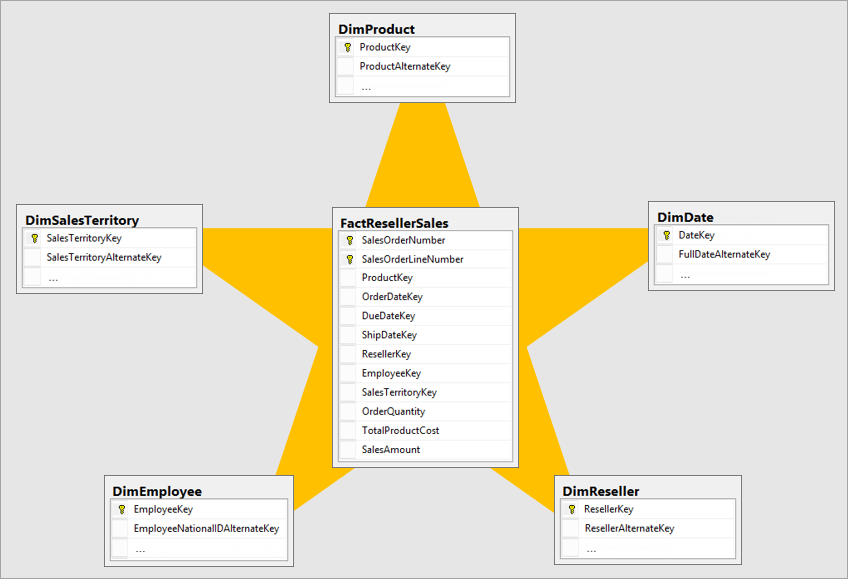
- Start Schema: love your star schema and tools like Power bi, Pivot tables, and SSAS will love and your end users will admire you. with star schema things just work. Great resource for Star Schemas with examples would be the The Data Warehouse Toolkit by Kimball Ross.
- Use your surrogate keys to do your joins not business keys. if you do not have surrogate keys in your Fact table I will show you how to get them. Surrogate keys are usually INT or BIGINT data types and works when propagating the filters in relationships. To get your surrogate keys from your dimensional tables to your fact tables do this:
SELECT DimensionKey = ISNULL(DimensionID,0)
, Amount
, Date
FROM Fact as F
LEFT JOIN Dimension as d
ON F.Businesskey = d. BusinessKey
AND F.RowEffectiveDate between d.RowEffectiveDate and d.RowExpirationDate
Now this query become your source for the Fact table, I highly recommend wrapping this in a view for the ease of manageability.
- Do not load columns you do not need for your analysis, stay away from the idea of I might need it later, well, if you need it later then load it later.
- Do not load ETL audit columns, such as: Batch Number, Batch Date etc… These are good for Data Warehouse auditing and are useless in business reporting and dashboarding.
- Load your date table from the Data Warehouse if you have one already, then if you don’t have one create one using DAX or m-code in the last it does not matter if you create it in DAX or m-code use what you are comfortable with.
- Hide columns that wont be used by users such as Surrogate keys.
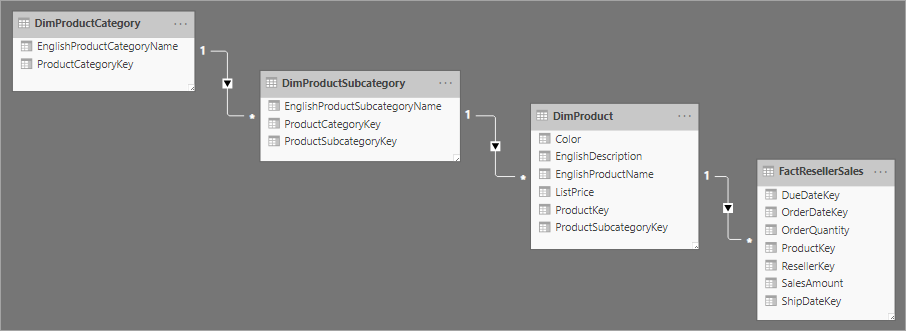
- Deformalize your dimension based of the Fact they describe to stay away from the snowflake schemas if you can they will low down your reports.
No! for this:
Big thumbs up! for this:
- If you have calculation that requires the total of multiple columns, create a column that totals the columns before loading it to the Model.
- Create all relationships between your Date table and dates in your fact table. When Creating measure use the USERELATIONSHIP function to activated the relationship at the measure level ( That means you can have multiple measures for the same columns but are calculated based on the date specified in the relationship.
- Do not make active relationships between dimensions, use inactive relationship and activate them as the measure level using USERELATIONSHIP and make sure to use CROSSFILTER with None parameter to deactivate the relationship between Fact and the dimension on the same measure. (Example you want to do some count of something before it had a value in the fact table this is useful).
- If you want to learn more about data modeling for power bi /ssas there is one place that teaches just that, www.sqlbi.com from Alberto Ferrari and Marco Russo.

More to come to take all these to details with examples in future post. If you have a question or feedback or if you do this in a different way please leave a comment or link to your blog in the comment below .